
v1_1
Table of Contents
Shield Revision v1.1
Overview
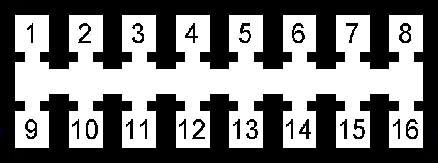
HEADER pin outs have changed substantially between v1.0 and v1.1, make note of the new pin out.
Layouts


Pin Out
 |
|||
|---|---|---|---|
| HEADER Pin # | Description | Schematic Net Name | Wire Color |
| Main Power | |||
| 8 | POWER IN | +12V | Red |
| 16 | GROUND | GND | Black |
| VR Sensor | |||
| 4 | VR+ | Green/White | |
| 5 | VR- | Green/White | |
| Digital I/O Inputs | |||
| 2 | Spare | S_IO | Orange |
| 3 | Performance | P_IO | Orange |
| 10 | Brake | B_IO | Orange |
| 11 | Cruise | C_IO | Orange |
| ADC I/O | |||
| 12 | ADC2 | Blue | |
| 13 | ADC1 | Blue | |
| 14 | ADC0 | Blue | |
| 7 | GROUND | GND | Black |
| 15 | POWER OUT | +5V | Red/Blue |
| CAN Bus | |||
| 1 | CAN Low | CANL | Yellow |
| 9 | CAN High | CANH | Yellow/White |
| SPARE | |||
| 6 | GROUND | GND | |
Turbo RPM Curve
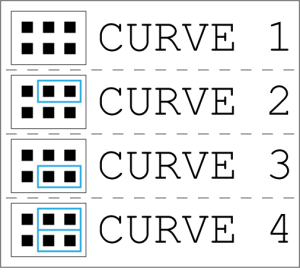 Selecting RPM curves is simple, just move the jumpers in to the corresponding pins for curve selection.
Curve 1 is the least aggressive curve.
Curve 4 is the most aggressive curve.
Performance Selection
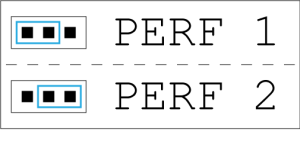
Selecting the performance option is simple, just move the jumpers in to the corresponding pins for the desired selection.
Perf 1 is the default option.
Perf 2 is the more aggressive performance option.
Bill of Materials
v1_1.txt · Last modified: 2019/06/06 17:44 by hakcenter